
You have seen it everywhere. A Discord name in bold cursive letters. An Instagram bio split into neat little sections with small caps. A TikTok username nobody else can copy because it looks nothing like normal text. It looks like a special font, but it is not a font at all, and once you know what it actually is, getting it for yourself takes about ten seconds.
What Fancy Text Actually Is
Fancy text is not a font. It is a set of special characters that already exist inside Unicode, the system every phone, computer, and app uses to display letters and symbols. When you turn a letter into bold, italic, or cursive fancy text, you are not changing how the letter A looks. You are swapping it for a completely different character, one that already looks bold or cursive on its own.
Because these are real characters, not a font file or an image, they copy and paste perfectly into almost any app. That is exactly why fancy text works the same way on Instagram, Discord, WhatsApp, and dozens of other apps without needing to install anything.

How Fancy Text Actually Works
Unicode includes a section called Mathematical Alphanumeric Symbols. It was originally added so people writing math equations could use bold or italic letters without inserting a picture. Fancy text tools quietly borrow this same set of characters for decoration, along with a few other Unicode sections for styles like small caps and circled letters.
| Style Type | Example | Where It Comes From |
|---|---|---|
| Bold, Italic, Script, Gothic | 𝐀 𝐴 𝒜 𝔄 | Mathematical Alphanumeric Symbols |
| Small Caps | ᴀ | IPA and Phonetic Extensions |
| Circled or Squared | Ⓐ 🄰 | Enclosed Alphanumerics |
| Superscript or Subscript | ᵃ ₐ | Superscripts and Subscripts |
Table: where each style of fancy text actually comes from inside the Unicode standard.
This is confirmed directly in the Unicode Consortium’s own published chart for the Mathematical Alphanumeric Symbols block, which lists exactly which styled letters and numbers it contains.
How to Get Fancy Text: The Same 3 Steps for Every App
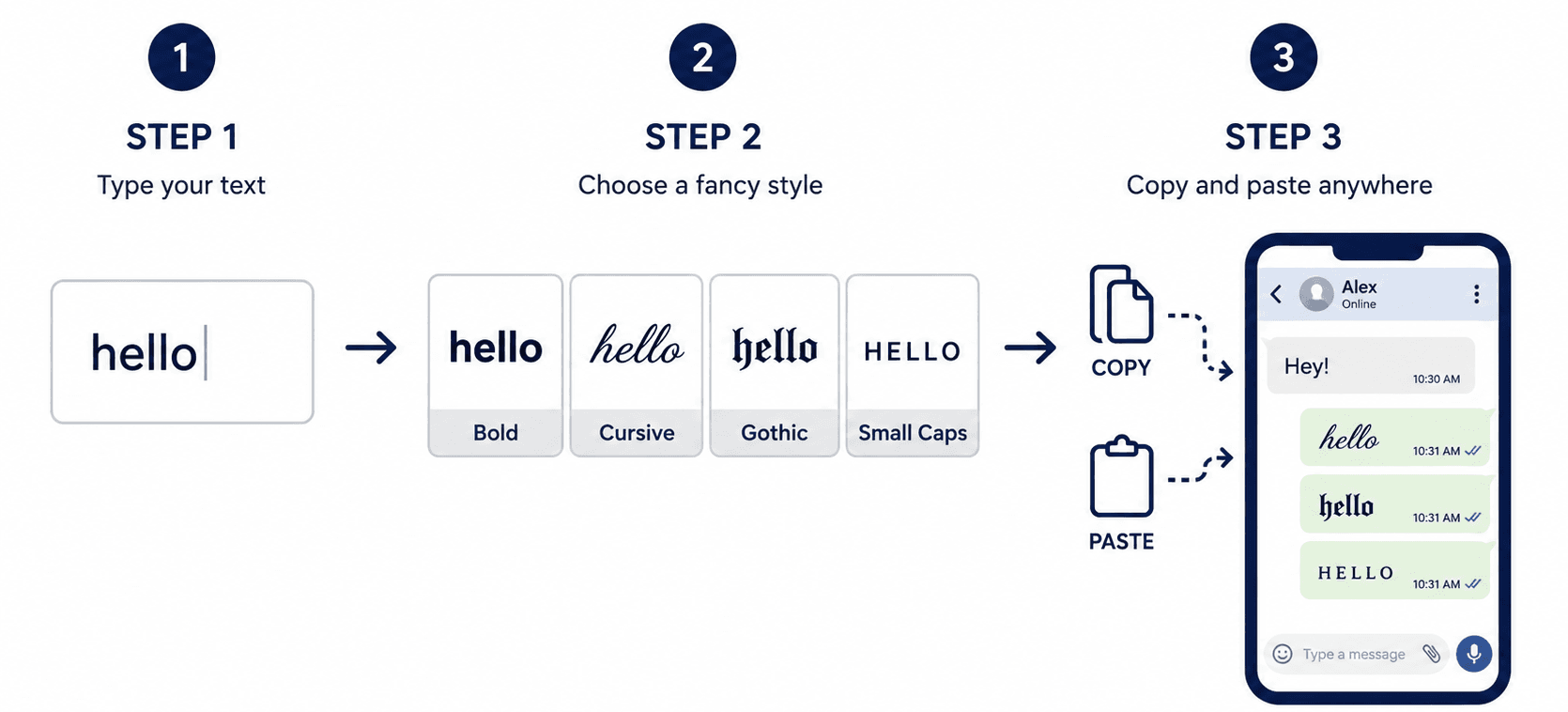
No matter which platform you are using, the actual process never changes. Only where you paste the result changes.
| Step | What to Do |
|---|---|
| 1. Type your text | Enter a name, phrase, or bio line into a fancy text generator |
| 2. Pick a style | Compare styles like Bold, Cursive, Gothic, or Small Caps side by side |
| 3. Copy and paste | Copy the style you like and paste it directly into the app you want |
Table: the same three steps work for every platform, only the final paste location changes.
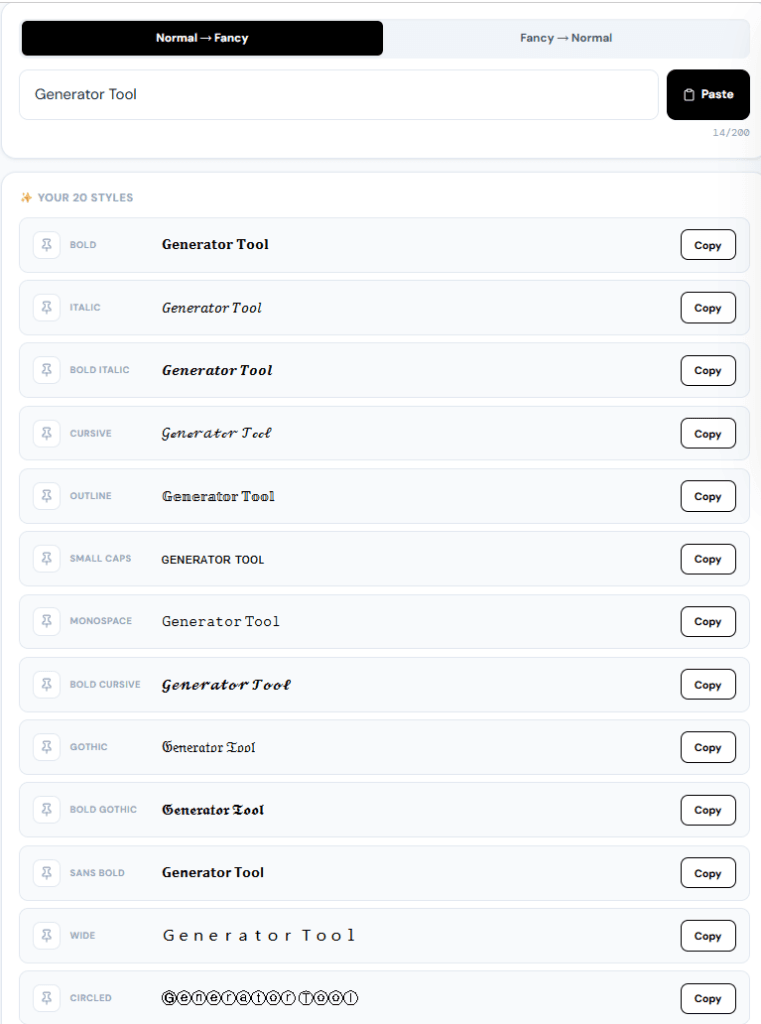
Our free Fancy Text Generator shows all 20 styles at once as you type, so you never have to guess. You just look at the list, pick the one you like, and copy it.
How to Get Fancy Text on Every Platform
The generator step is identical everywhere. What changes is how well each platform displays the result, and where exactly you would paste it.
| Platform | Best Places to Paste It | Recommended Style |
|---|---|---|
| Bio, display name, captions | Bold or Gothic for a strong first impression | |
| TikTok | Display name, captions | Bold or Cursive, since usernames have tighter character limits |
| Discord | Display name, server nickname, status | Cursive or Small Caps, both display well across most Discord clients |
| Status text, group names | Bold or Italic, kept short since status text has a character limit | |
| Posts, bio section | Bold or Small Caps for section headers inside a longer post | |
| iPhone | Notes, messages, contact names | Any established style, since iOS has strong Unicode font support |
| Roblox | Display name, chat, group descriptions | Simple, well established styles, since chat filters can block newer Unicode ranges |
| Minecraft | Signs, chat, world names (Java Edition) | Small Caps and Bold tend to render most reliably in game |
Table: where to paste fancy text on each major platform, and which style tends to work best there.
How to Get Fancy Text on Instagram
Instagram bios are one of the most common places people use fancy text, since the platform gives you no built in way to add headers or bold text. Small Caps is popular here specifically because it acts as a visual divider, letting you split a long bio into clear, readable sections without any special formatting tools.
How to Get Fancy Text on TikTok
TikTok usernames and display names both accept fancy text, though usernames have a shorter character limit than display names. If a style looks cut off or missing when you paste it into your username field specifically, try a shorter phrase or switch to your display name instead, which usually allows more characters.
How to Get Fancy Text on Discord
Discord accepts almost every fancy text style in display names, server nicknames, and even in your custom status. Cursive and Small Caps are especially popular here because they consistently render correctly across desktop, web, and mobile versions of Discord.
How to Get Fancy Text on WhatsApp
WhatsApp status updates and group names both support fancy text. Since status text is limited to a small number of characters, shorter, punchier styles like Bold tend to work better than long cursive phrases that eat up your character limit quickly.
How to Get Fancy Text on Facebook
Facebook posts and bio sections both accept fancy text well. A common use here is pasting a Small Caps or Bold line at the top of a longer post to act as a heading, since Facebook’s post editor has no built in formatting tools of its own.
How to Get Fancy Text on iPhone
Since fancy text is just Unicode, it works the same way on iPhone as it does anywhere else. Copy your styled text from the generator, then paste it into Notes, Messages, a contact name, or any app that accepts normal typed text.
How to Get Fancy Text in Roblox
Roblox display names and chat both accept many fancy text styles, though Roblox’s chat filter can sometimes block newer or less common Unicode ranges. If a style gets filtered out or shows as blank, switch to a simpler, more widely supported style like Bold or Italic.
How to Get Fancy Text in Minecraft
In Minecraft Java Edition, fancy text can be pasted into signs, chat messages, and world names. Small Caps and Bold tend to be the most reliable, since Minecraft’s built in font does not include glyphs for every possible Unicode character.
Which Fancy Text Style Should You Use?
With 20 styles available, picking one can feel harder than it needs to be. It usually comes down to what you are actually trying to do with the text.
| Goal | Best Style | Why |
|---|---|---|
| Stand out in a gaming username | Gothic or Cursive | Distinct enough that almost nobody else has the same look |
| Add a section header in a bio | Small Caps | Reads clearly at a smaller size, works well as a divider |
| Emphasise a short phrase | Bold | Most widely supported style, renders correctly almost everywhere |
| A playful or joke message | Upside Down | Best kept short, since long phrases become harder to read |
Table: matching a fancy text style to what you are actually trying to achieve.
Why Some Fancy Text Shows as Boxes or Question Marks
Every Unicode character needs a font on the device displaying it that actually includes a drawing for that character. Common styles like Bold and Italic have been part of the Unicode standard since 2001, so nearly every modern font supports them well. Less common styles, or ones from newer Unicode sections, are more likely to show up as an empty box on an older device.
| Problem | Likely Cause | Fix |
|---|---|---|
| Text shows as empty boxes | The device’s font does not include that character | Switch to a simpler style like Bold or Italic |
| Text disappears completely | The platform’s filter blocked that Unicode range | Try a shorter phrase or a more common style |
| Some letters look wrong | Mixing multiple styles in one phrase | Stick to one style per phrase for consistent results |
Table: common fancy text display problems and their fixes.
This is not a bug in the generator, and it is not a problem with the text itself. It is simply a gap in that specific platform’s font coverage, and it usually clears up the moment you switch to a more established style.
Common Mistakes People Make With Fancy Text
| Mistake | Fix |
|---|---|
| Using very decorative styles for long paragraphs | Save the fancier styles for short phrases or headers instead |
| Assuming fancy text is a downloadable font | Remember it is just Unicode text, so nothing needs installing |
| Not testing a style before relying on it | Paste your chosen style once and check it looks right on that platform first |
| Trying to convert Upside Down text back to normal | Know that a few flipped letters cannot be reversed with full certainty |
Table: common fancy text mistakes and how to avoid each one.
Fancy Text vs. a Downloadable Font App
| Method | Install Needed | Works Across Apps |
|---|---|---|
| Fancy text generator | No, works in any browser | Yes, since it is standard Unicode text |
| Downloadable font app | Yes, and often only changes your own device’s display | Usually no, other people often just see plain text |
Table: why fancy text generators work more reliably than font apps for names other people will see.
This is the biggest thing people misunderstand. A font app changes how text looks on your own screen, but not on anyone else’s. Fancy text is different, since it changes the actual character being sent, everyone else sees the same styled result you do.
Try the Free Fancy Text Generator
Our free Fancy Text Generator shows all 20 Unicode styles at once, including Bold, Cursive, Gothic, and Small Caps, so you can compare them side by side instead of guessing.
- 20 styles shown instantly as you type, no signup required
- Pin your favourite styles for quick access later
- Fancy to Normal converter, in case you need to reverse styled text back to plain letters
- Works entirely in your browser, nothing you type is ever uploaded to a server
- Copy any single style, or copy every style at once as a labelled list
Frequently Asked Questions
How do I get fancy text for free?
Type your text into a fancy text generator, browse the styles it shows you, and copy the one you like. No signup or payment is needed, since the tool simply swaps your letters for existing Unicode characters.
Does fancy text work on Discord?
Yes. Discord accepts fancy text in display names, server nicknames, and status messages. Cursive and Small Caps tend to display the most reliably across Discord’s desktop, web, and mobile apps.
Why does my fancy text look like boxes on some apps?
That happens when the app’s font does not include a drawing for that specific Unicode character. It is a display limitation on that platform, not a problem with the generator or the text itself. Switching to a more common style like Bold usually fixes it.
Can I use fancy text on Instagram, TikTok, and WhatsApp at the same time?
Yes. Since fancy text is standard Unicode, the exact same styled text can be pasted into all three, and most other apps, without needing to generate it separately for each one.
Is fancy text a real font I need to install?
No. It is not a font at all. It is a set of existing Unicode characters that already look styled, bold, cursive, or gothic, so nothing needs to be downloaded or installed on your device.
Can fancy text be converted back to normal text?
Yes, for most styles, including Bold, Italic, Cursive, and Gothic. Upside Down text is the one exception, since a small number of flipped letters look identical to each other, making a perfect reverse conversion impossible in those cases.
Conclusion: Key Takeaways
- Fancy text is not a font. It is a set of real Unicode characters, which is exactly why it copies and pastes correctly into almost any app.
- The process is identical everywhere, type it, pick a style, copy and paste it, whether you are on Instagram, TikTok, Discord, WhatsApp, Facebook, iPhone, Roblox, or Minecraft.
- Some styles occasionally show as boxes on certain platforms, which is a font coverage gap on that device, not an error in the text.
- Unlike a downloadable font app, fancy text looks the same to everyone who sees it, not just on your own screen.
- You can generate your own styled text right now with the free Fancy Text Generator, no signup, nothing saved, ready in seconds.
Try Other Relevant Tools:
Read Also:
Why Extra Whitespace Is Silently Wrecking Your Essay, Code, and Website
How to Count Words in a PDF on Mac, Windows, or Online (No Software Needed)
- How to Find and Fix Passive Voice in Word, Google Docs, and Your Essay (Step-by-Step)
Where is the Word Counter on Google Docs? (And How to Keep It on Screen)
Free Reverse Text Generator Online: Backwards & Mirror Text Generator
What is Fluff Text? Meaning, Writing Examples, and Free Fluff Checker
How to Clean Messy Text Formatting: The Complete Guide to Copied PDF, Web, and AI Text